Installation & operating instructions

Installation & operating instructions

Installation & operating instructions

On the Viessmann ViBooks website you will find operating instructions and other documents for Viessmann devices.

You can not only select the language in which you want to search for the respective document, but also start a full text search in all documents, for example.

These step-by-step instructions show you how to connect and commission the Vitoconnect communication module:

            You can reset all changed values of the communication module to their factory settings. To perform factory reset do as follow:

            • Press the reset button B for at least 30 seconds.
            • When the LED aa601354-d668-4415-b502-da9803498ea0 flashes red, briefly press the reset button B again within 5 seconds.
            • The LED aa601354-d668-4415-b502-da9803498ea0 stops blinking and turns off. The Vitoconnect restarts now.

                      For your ViCare Radiator Thermostat to work properly, you must ensure that it is attached to the radiator with the correct adapter. The following 4 adapters are included in the scope of delivery: 

                      1. M30 thread diameter for valve types VA 80VA 81 HVA 02VA 94 and VA 04 H
                      2. RA for valve adapter VA 78 with flange connection
                      3. RAV for valve adapter VA 72 with flange connection
                      4. RAVL for valve adapter VA 59 with flange connection

                      Please note: In rare cases, adapters other than the 4 included are required. These can be purchased online at a reasonable price. If in doubt, please contact your installer.

                      Once ViCare Smart Climate is activated and the components are installed, you can no longer set schedules or temperatures directly on your heating system's display. ViCare Smart Climate takes full control – all settings are now managed conveniently via the ViCare app. With the “Other Rooms” feature, you can also control and adjust additional rooms directly through the app.

                      Further informations:

                      The individual steps for mounting your new ViCare Radiator Thermostat are as follows:

                      1. Before removing the previous radiator actuator, the valve must be wide open. To do this, turn the actuator to the highest position.
                      2. Fit the connection adapter to the thermostatic valve. You can find out which adapter is the right one here.

                      3. Open the ViCare radiator thermostat and insert the batteries (2 x 1.5V LR6 type AA, no rechargeable batteries). “- -” appears on the display. This indicates the delivery status. Installation mode is active.

                      4. Mount the thermostat firmly on the connection adapter by turning it to the right (clockwise).
                      5. Turn the thermostat to the left (counterclockwise) and align the display A as required.
                      6. Press button B for at least 3 seconds to close the thermostatic valve. The room temperature setpoint is shown on the display.

                      7. Set the desired room temperature setpoint by turning the thermostatic head C.

                      The ViCare thermostat can now be added to the Viessmann cloud infrastructure (put into operation).

                      The ViCare Radiator Thermostat consists of the following control elements:

                      A: Display
                      B: Control button
                      C: Thermostatic head

                      If you turn the thermostat head to the right, you increase the room temperature setpoint in steps of 0.5°C (audible click). Turning to the left reduces it in steps of 0.5°C.

                                    Current room temperature set-point.

                                    • The dot behind the temperature display means 0.5°C.

                                      – –      Mounting (assembly) mode 
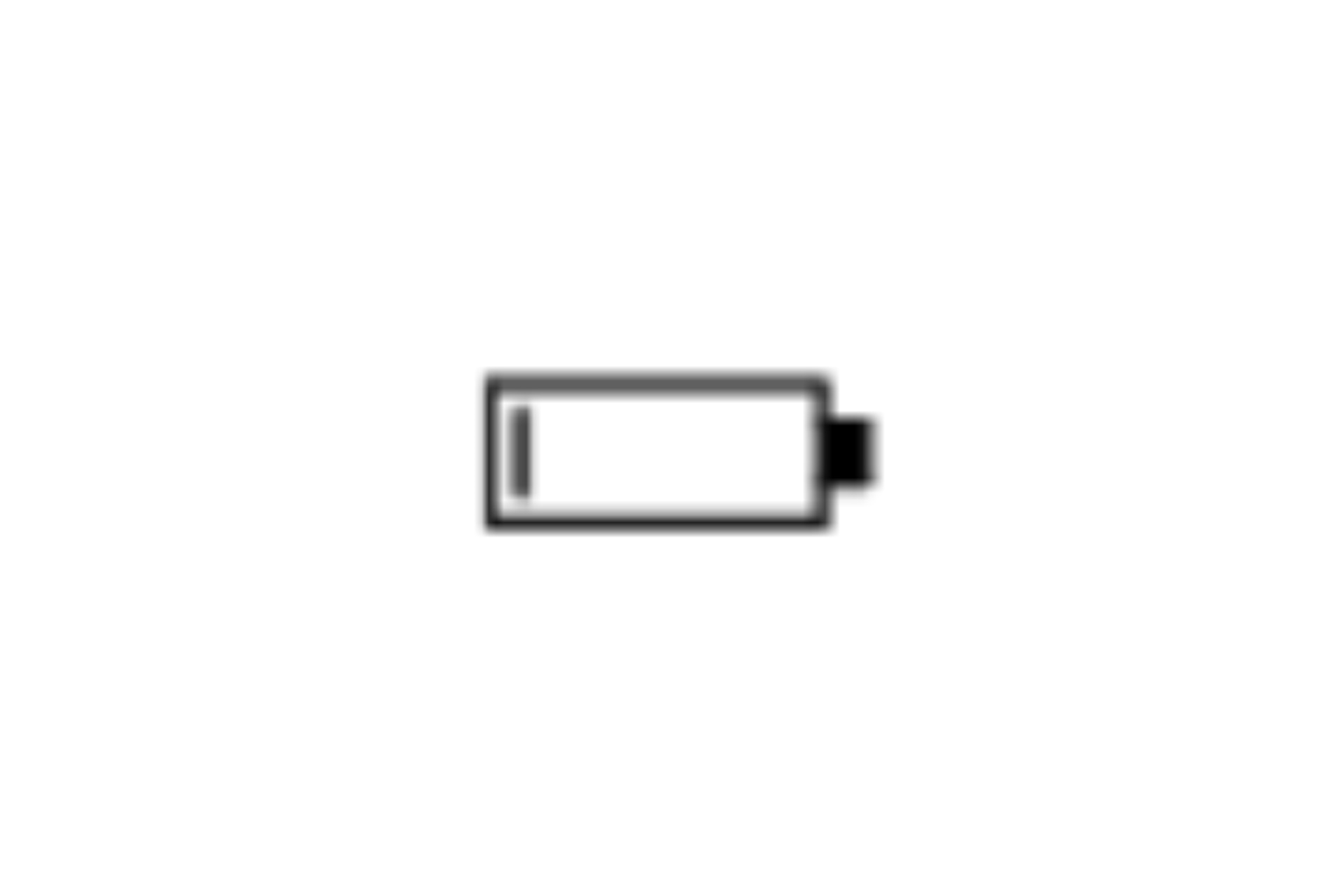
                                      2020-04-28_13_57_44-PDF_Architect_6___eTRV_official_DE_1_.PDF.png     Battery charge level

                                      2020-04-28_13_57_57-PDF_Architect_6___eTRV_official_DE_1_.PDF.png     Status of the radio connection:

                                    Lights up permanently the radio connection is active.
                                    Flashes (the LED is on once every second) - the radio connection is interrupted.
                                    Flashes quickly (the LED is on twice every second)- the radio connection is being established.

                                    Note
                                    If the radio connection between the thermostat and gateway has been interrupted, the details on the radiator thermostat display are automatically rebuilt as soon as the connection is re-established.

                                    Standby mode indicator
                                    If you do not change any settings on the radiator thermostat for 5 seconds, the standby mode is activated and the display goes dark.

                                    Adding a ViCare Radiator Thermostat
                                    With ViCare Smart Climate, you can add a second and additional thermostats in both existing and new rooms within the same ViCare Smart Climate system after the first setup. Read here how to add a new room via the ViCare app.

                                    How to add a new ViCare Radiator Thermostat:

                                    • Under “Settings” in the ViCare app, select “ViCare Smart Climate”.
                                    • Tap on the “Add device” button.
                                    • Select “ViCare Thermostat”.
                                    • Select an existing room or create a new room in which you want to set up the device. To do this, click on “Add new room”.
                                    • Select the heating circuit according to the number of heating circuits operated by the heating device. If only one heating circuit is active, this screen will not appear. If you are using the standalone version of ViCare Smart Climate, this screen will not appear either.
                                    • Follow the further instructions in the app.

                                    Teach-in process (in conjunction with Viessmann One Base or Vitoconnect OPTO2)

                                    • Open “Settings” in the ViCare app and tap on “Single Room Control”. Follow the instructions in the app.
                                    • Scan the access code (QR code) A on the thermostat.
                                    • Now start the teach-in process:
                                      Briefly press the operating button B.  flashes.
                                      The display shows:
                                      • If teach-in is successful:  lights up permanently and “--” flashes. The installation mode is active.
                                      • If teach-in failed: E7 is displayed. Repeat the teach-in process.

                                    Please note: The teach-in process is only possible in installation mode. If the thermostat is not in installation mode, press the operating button B for approx. 3 seconds until “--” is displayed.

                                    • Close the thermostat and set the desired room temperature setpoint by turning the thermostat head C.

                                    For installations without a gateway the teach-in process is not necessary.

                                                  Assigning the ViCare Radiator Thermostat to another room
                                                  With ViCare Smart Climate, you can transfer the ViCare thermostat to another room that already exists in the same installation.

                                                  How to transfer a thermostat to another room:

                                                  • Select “ViCare Smart Climate” under “Settings” in the ViCare app.
                                                  • Select the room from which the device is to be transferred.
                                                  • Then select the device to be transferred by clicking on the corresponding device in the “Connected devices” list.
                                                  • Tap the “Room” button again. This opens the menu in which you can select the future room for the component.
                                                  • Confirm the selection by tapping on “Save”. The component is now transferred and deleted from the original room.

                                                  Disconnecting the ViCare Radiator Thermostat
                                                  With ViCare Smart Climate, you can remove the ViCare thermostat from the ViCare Smart Climate system at any time by disconnecting it.

                                                  To remove a thermostat:

                                                  • Select “ViCare Smart Climate” under “Settings” in the ViCare app.
                                                  • Select the room from which the device is to be removed.
                                                  • Select the device to be removed by clicking on the corresponding device in the “Connected devices” list.
                                                  • Tap on “Disconnect”.
                                                  • Confirm the process. The device is removed from ViCare Smart Climate.

                                                  The factory setting of the thermostat can be done by using factory reset function. The following assignments will be erased:

                                                  • The connection to the gateway is removed.
                                                  • All error messages and settings are reset.

                                                  To perform factory reset do as follow:

                                                  • Remove the cover. Take out the battery and press button A.
                                                  • Press button A and put the battery back. Hold down the control button A for at least 5 seconds. On radiator thermostat all the display should light up for approx. 2 seconds.  Then the “- -” is displayed. The assembly mode is active. Release the button A.
                                                  • Close the cover.

                                                                Step 1: Remove the thermostat casing

                                                                • The release tab is located opposite the thermostat display. Press it very firmly with your thumb while simultaneously pulling the thermostat cover away from the valve and towards you.
                                                                • During this process, use your other hand to press on the Viessmann logo at the end of the thermostat to make it easier to remove the casing.

                                                                Step 2: Open the valve

                                                                • Press button A next to the display for at least 3 seconds until you feel a slight vibration. As soon as the display shows “- -”, the valve is open.
                                                                  This makes it easier to remove the thermostat.

                                                                Step 3: Remove the thermostat

                                                                • Press the release tab again while simultaneously turning the thermostat anticlockwise.
                                                                • The thermostat is now detached from the adapter and can be removed.

                                                                              Depending on the type of power supply, the device can be operated as a climate sensor or as a repeater.

                                                                              ViCare Climate Sensor
                                                                              In battery mode, the device works as a sensor for room temperature and humidity. It can only be used in conjunction with a heat generator with Viessmann One Base or Vitoconnect (OPTO2 or higher) as an internet interface. Stand-alone use is not possible.

                                                                              ViCare Repeater
                                                                              When operated with the supplied plug-in power supply unit, the device works as a repeater. It then increases the range of the low-power radio via which the ViCare devices communicate with each other.

                                                                              Please note: If the device was already registered as a ViCare Repeater, i.e. with a plug-in power supply unit, and you want to use it as a climate sensor or vice versa, you must first reset it to the factory setting. You must then reprogram the device using the ViCare app.

                                                                              Further information:

                                                                              Product information
                                                                              Depending on the type of power supply, the device can be operated as a ViCare Climate Sensor or as a ViCare Repeater.

                                                                              To use the device as a climate sensor, you must use it in battery mode (battery 3 V CR2450). The ViCare Climate Sensor records the room temperature and humidity and sends this information to the Viessmann gateway, i.e. to a Viessmann One Base system (with integrated WiFi) or a system with the external Vitoconnect communication module. The sensor cannot be used without such a gateway.


                                                                              A  Viessmann gateway (One Base or Vitoconnect)
                                                                              B  Low power radio
                                                                              C  ViCare Climate Sensor
                                                                              D  WiFi
                                                                              E  WiFi router (on site)
                                                                              F  Secured internet connection to the Viessmann cloud infrastructure
                                                                              G  Viessmann server
                                                                              H  Cellular network or WiFi connection
                                                                              K  Mobile device

                                                                              Note: Please note that the compatibility of iOS and Android devices is changing over time. It is therefore indispensable to maintain the latest updates, and if necessary even to provide the replacement of end devices to ensure the proper functioning of applications supporting the operation of ViCare Smart Climate.

                                                                              Mounting preparation
                                                                              The best place in your room to mount a ViCare Climate Sensor should be in the open area. Here is the list of guidelines how to optimize the usage of the climate sensor:

                                                                              • Installation only within closed buildings
                                                                              • The installation site must be dry and frost-free
                                                                              • Distance to the floor: minimum 1.5m
                                                                              • Not near windows and doors
                                                                              • Not over radiators
                                                                              • Not near heat sources (direct sun radiation, fireplace, TV, etc.)
                                                                              • Ambient temperature value should not exceed the range between +5 and +40°C

                                                                              Note

                                                                              Wall mounting

                                                                              • Attach the nail into the wall.
                                                                              • Place the device on the nail head.

                                                                                            Mounting angle
                                                                                            The vertical impact of the radio signals on walls has a positive effect on the reception quality. The changes depending on the penetration angle effective wall thickness and thus the damping of the electromagnetic waves.

                                                                                            Illustration 1 shows an unfavorable angle, illustration 2 a favorable one.

                                                                                            A   ViCare Climate Sensor
                                                                                            B   Device with Viessmann One Base or Vitoconnect
                                                                                            C   Wall

                                                                                            Before you can put the ViCare Climate Sensor into operation, you must program it. To do this, follow these steps:

                                                                                            • Remove the ViCare Climate Sensor from the wall.
                                                                                            • Open the ViCare app.
                                                                                            • Click on “ViCare Smart Climate” in the “Settings” area. Follow the further instructions in the app.
                                                                                            • Scan the QR code D on the back of the ViCare Climate Sensor with your mobile device.
                                                                                            • Confirm the teach-in process by briefly pressing the operating button C.
                                                                                            • The teach-in process can take up to 3 minutes. During this time, the status LED flashes green. If the teach-in process was successful, the status LED lights up green for approx. 5 seconds. The successful connection is displayed in the ViCare app.
                                                                                            • Attach the ViCare Climate Sensor to the wall again.


                                                                                                          A   Status LED
                                                                                                          B   This is where the temperature and humidity measurement is taking place. Do not cover!
                                                                                                          C   Control button
                                                                                                          D   QR code

                                                                                                          Please note: If the device was already registered as a ViCare wireless repeater, i.e. with a plug-in power supply unit, you must first reset it to the factory setting. You can find out how to do this here. You must then reprogram the device with the ViCare app as described above.

                                                                                                          Adding a ViCare Climate Sensor
                                                                                                          With ViCare Smart Climate, you can add a ViCare Climate Sensor to both existing and new rooms within the same installation. You can read how to add a new room via the ViCare app here.

                                                                                                          How to commission a new ViCare Climate Sensor:

                                                                                                          1. Under “Settings” in the ViCare app, select “ViCare Smart Climate”.
                                                                                                          2. Tap on the “Add device” button.
                                                                                                          3. Select “ViCare Climate Sensor”.
                                                                                                          4. Select an existing room or create a new room in which you want to set up the device. To do this, click on “Add new room”.
                                                                                                          5. Follow the instructions in the app and insert the battery (3 V CR2450).

                                                                                                          After commissioning the ViCare Climate Sensor and pairing it with the desired room, the data measured by the device is displayed on the ViCare dashboard. If you click on the room tile in the ViCare app dashboard, you will also find the humidity value next to the measured temperature in the room view.

                                                                                                          Assigning the ViCare Climate Sensor to another room

                                                                                                          With ViCare Smart Climate, you can transfer the device to another room that already exists in the same Smart Climate installation.

                                                                                                          To transfer a climate sensor to another room:

                                                                                                          1. Select “ViCare Smart Climate” under “Settings” in the ViCare app.
                                                                                                          2. Select the room from which the device is to be transferred.
                                                                                                          3. Then select the device to be transferred by clicking on the corresponding device in the “Connected devices” list.
                                                                                                          4. Tap the “Room” button again. This opens the menu in which you can select the future room for the component.
                                                                                                          5. Confirm the selection by tapping on “Save”. The component is now transferred and deleted from the original room.

                                                                                                          Disconnecting the ViCare Climate Sensor
                                                                                                          With ViCare Smart Climate, you can remove the ViCare climate sensor from the ViCare Smart Climate system at any time by disconnecting it.

                                                                                                          To remove a climate sensor:

                                                                                                          1. Select “ViCare Smart Climate” under “Settings” in the ViCare app.
                                                                                                          2. Select the room from which the device is to be removed.
                                                                                                          3. Select the device to be removed by clicking on the corresponding device in the “Connected devices” list.
                                                                                                          4. Tap on “Disconnect”.
                                                                                                          5. Confirm the process. The device is removed from ViCare Smart Climate.

                                                                                                                        Press the operating button C for less than 2 seconds to have the current temperature and humidity values sent to your Viessmann One Base System or Vitoconnect. You can then call up the values via the room tile on the dashboard of the ViCare app.


                                                                                                                        A   Status LED
                                                                                                                        B   This is where the temperature and humidity measurement is taking place. Do not cover!
                                                                                                                        C   Control button
                                                                                                                        D   QR code

                                                                                                                                      The ViCare climate sensor requires a CR2450 coin cell battery. Please ensure that the battery type does not include any additional designations. For example, types such as CR2450n or CR2450l have different dimensions and will NOT fit in the ViCare climate sensor.


                                                                                                                                        A   Status LED
                                                                                                                                        B   This is where the temperature and humidity measurement is taking place. Do not cover!
                                                                                                                                        C   Control button
                                                                                                                                        D   QR code

                                                                                                                                        Battery status
                                                                                                                                        You can see the battery status via the following displays:

                                                                                                                                        • Display in the ViCare app
                                                                                                                                        • Status LED on the ViCare climate sensor

                                                                                                                                        To check the battery status on the sensor, press the operating button C briefly (less than 2 seconds).

                                                                                                                                        • Status LED flashes green once: good battery condition
                                                                                                                                        • Status LED flashes red once: low battery condition

                                                                                                                                        Please note that only if the ViCare Climate Sensor has been taught, the battery status display works. Here you can find out how to teach the device.

                                                                                                                                                      The ViCare Repeater can be mounted on a wall as follows:

                                                                                                                                                      • Attach the nail into the wall.
                                                                                                                                                      • Place the device on the nail head.

                                                                                                                                                                    To put the ViCare Repeater into operation, please proceed as follows:

                                                                                                                                                                    • Remove the battery if necessary.*
                                                                                                                                                                    • Insert the micro USB plug into the device.
                                                                                                                                                                    • Plug the power supply unit into a 230V/50Hz earthed socket, max. 1m from the installation location.

                                                                                                                                                                    New installation
                                                                                                                                                                    For a new installation, we recommend this sequence for commissioning:

                                                                                                                                                                    1. Heat generator or ventilation unit
                                                                                                                                                                    2. ViCare Repeater
                                                                                                                                                                    3. ViCare components, e.g. ViCare Climate Sensor, ViCare Floor Heating Thermostat, ViCare Radiator Thermostat, Vitotrol etc.

                                                                                                                                                                    Existing installation
                                                                                                                                                                    If you integrate the ViCare radio repeater into an existing installation and the connection strength is not yet sufficient, please switch your heat generator or ventilation unit off and on again for approx. 15 minutes. If necessary, use the operating instructions for your device, which you can also find online here.

                                                                                                                                                                    *Please note: If the device has already been registered as a ViCare Climate sensor (in battery mode), you must first reset the device to the factory setting. You can find out how to do this here. You must then reprogram the device using the ViCare app.

                                                                                                                                                                                  Adding a ViCare Repeater
                                                                                                                                                                                  With ViCare Smart Climate, you can add a ViCare Repeater to your installation. Unlike the other ViCare components, it is not necessary to assign the device to a room. The repeater therefore does not appear at room level, but can be found in the list of system devices between other paired devices. Together with the serial number, the signal strength of the device is visible - this allows you to find the best place to set up the wireless repeater to support all other devices.

                                                                                                                                                                                  To put a new ViCare Repeater into operation:

                                                                                                                                                                                  • Under “Settings” in the ViCare app, select “ViCare Smart Climate”.
                                                                                                                                                                                  • Tap on the “Add component” button.
                                                                                                                                                                                  • Select “ViCare Repeater”.
                                                                                                                                                                                  • Follow the instructions in the app.

                                                                                                                                                                                  Removing the ViCare Repeater
                                                                                                                                                                                  With ViCare Smart Climate, you can remove the ViCare wireless repeater from the ViCare Smart Climate system at any time by disconnecting it.

                                                                                                                                                                                  How to remove a repeater:

                                                                                                                                                                                  • Under “Settings” in the ViCare app, select “ViCare Smart Climate”.
                                                                                                                                                                                  • Under “System components”, click on “Other devices” and scroll down the page to “Connected repeaters”.
                                                                                                                                                                                  • Select the repeater you want to remove and click on “Disconnect” on its settings page.
                                                                                                                                                                                    Confirm the process. The device is removed from ViCare Smart Climate.

                                                                                                                                                                                  Further information:

                                                                                                                                                                                  • In these cases, the use of a ViCare Repeater is recommended.

                                                                                                                                                                                                If you want to reset the device to the factory settings, please note that the connection to your Viessmann One Base system or to the Vitoconnect and to all other ViCare components will be disconnected. Don't forget to remove this device after the factory reset.

                                                                                                                                                                                                To restore the factory settings, please follow these steps:

                                                                                                                                                                                                • Remove the device from the wall.
                                                                                                                                                                                                • Press the operating button C on the device for at least 10 seconds. The status LED lights up red.
                                                                                                                                                                                                • Press the operating button C 5 × in succession (within 10 seconds). The status LED flashes red and green alternately 3 times.
                                                                                                                                                                                                • The factory setting of the appliance is restored.

                                                                                                                                                                                                                A   Status LED
                                                                                                                                                                                                                B   This is where the temperature and humidity measurement is taking place. Do not cover!
                                                                                                                                                                                                                C   Control button
                                                                                                                                                                                                                D   QR code

                                                                                                                                                                                                                Note: After reset to the delivery condition, bringing the ViCare Floor Heating Controller back into operation will require the support of the Viessmann technician to reconnect the device with the ViCare Smart Climate system.

                                                                                                                                                                                                                The reset to delivery condition (factory settings reset) of the ViCare Floor Heating Controller can be done by using factory reset function. The following assignments will be erased:

                                                                                                                                                                                                                • The connection to the gateway is removed

                                                                                                                                                                                                                • All error messages and settings are reset

                                                                                                                                                                                                                To perform factory reset do as follow:
                                                                                                                                                                                                                Step 1. Remove the cover.
                                                                                                                                                                                                                Step 2. Press button T2 with a pointed object (e.g. paper clip) and hold it down for at least 5 seconds. Release the button.
                                                                                                                                                                                                                Step 3. Close the cover.

                                                                                                                                                                                                                                Note: Since the underfloor heating system is a fixed part of the building, the ViCare underfloor heating controller must, by law, be installed by a qualified professional. Please contact the Viessmann technical service for this.

                                                                                                                                                                                                                                The ViCare Floor Heating Controller doesn’t offer any operation control interface on the main unit. The available buttons and LEDs on the main unit serves the initial assembly and troubleshooting only purposes.

                                                                                                                                                                                                                                The interaction with the Floor Heating Controller in the ViCare Smart Climate solution is done via mobile ViCare application and Viessmann technician’s professional tools.

                                                                                                                                                                                                                                ViCare Floor Heating Controller: main unit’s LEDs

                                                                                                                                                                                                                                LED 1-6:


                                                                                                                                                                                                                                Each heating zone state is equipped with three-color LED (red, green, orange) with the following meaning:

                                                                                                                                                                                                                                • LED OFF: no valve actuator is detected

                                                                                                                                                                                                                                • LED green: valve actuator is detected and it’s powered up (the state is under adjustment)

                                                                                                                                                                                                                                • LED orange: valve actuator is detected but not powered at the moment

                                                                                                                                                                                                                                • LED red: Short circuit detected at valve actuator (error state)

                                                                                                                                                                                                                                LED 7:

                                                                                                                                                                                                                                • LED OFF: The Floor Heating Controller is not supplied with power.

                                                                                                                                                                                                                                • LED green: The Floor Heating Controller is connected to the ViCare Smart Climate gateway via radio

                                                                                                                                                                                                                                • LED orange: The Floor Heating Controller has no connection to the ViCare Smart Climate gateway 

                                                                                                                                                                                                                                • LED red (flashing):

                                                                                                                                                                                                                                  • 3 times at intervals The internal fuse of the ViCare floor thermostat is faulty. Notify your contractor.
                                                                                                                                                                                                                                  • 4 times at intervals Software overcurrent detection active

                                                                                                                                                                                                                                When the power supply is connected to the floor thermostat, the initialization run is carried out. During the initialization run the status LED (7) flashes green for 90 seconds. The valve LEDs (1-6) light up green briefly one after the other as soon as they are activated (if the connected valve actuator is detected).

                                                                                                                                                                                                                                                Note: Since the floor heating system is a fixed part of the building, the ViCare Floor Heating Controller must, by law, be installed by a qualified professional. Please contact the Viessmann technical service for this.

                                                                                                                                                                                                                                                The ViCare Floor Heating Controller is an electronic accessory designed for the management of heating systems build-in floors of the user’s household. In operation with the ViCare Smart Climate, the heat demand is automatically determined and optimally controlled according to the defined room’s heating time schedules.

                                                                                                                                                                                                                                                Communication of the ViCare Floor Heating Controller with the ViCare Smart Climate is wireless via radio.

                                                                                                                                                                                                                                                The ViCare Floor Heating control system consists of:

                                                                                                                                                                                                                                                •  the base unit;

                                                                                                                                                                                                                                                • a set of thermal actuators (valves), in a total of 18 pcs. All grouped in up to 6 independent zones/rooms (max 3 actuators per zone);
                                                                                                                                                                                                                                                • at least one ViCare Climate Sensor per Room. The local, wireless sensor for precise room temperature readings.

                                                                                                                                                                                                                                                The schematic application for of ViCare Floor Heating Controller with ViCare Smart Climate is presented at the diagram below:

                                                                                                                                                                                                                                                For E3 boilers:

                                                                                                                                                                                                                                                where:

                                                                                                                                                                                                                                                A   ViCare Climate Sensor
                                                                                                                                                                                                                                                B   ViCare Floor Heating main unit
                                                                                                                                                                                                                                                C   Gateway (Vitoconnect OPTO2 or E3 build-in connectivity device)'
                                                                                                                                                                                                                                                D   W-LAN Router (Internet gateway)

                                                                                                                                                                                                                                                The ViCare Floor Heating Controller is designed to work with 230 /50 Hz VAC power supply. It is compatible for operation with 230 VAC open/closed thermal actuators (valves). Operation of the ViCare Floor Heating Controller outside the specified performance limit or incorrect system deployment can lead to a damage of the device, electric shock or fire.

                                                                                                                                                                                                                                                Due to health and property damage risk, the ViCare Floor Heating Controller system assembly must be executed by the trained Viessmann technician. Please contact your local Viessmann sales representative for details.

                                                                                                                                                                                                                                                Additional notes on assembly restrictions:

                                                                                                                                                                                                                                                • In radio technology, it is important to note that a range of radio signals through walls, roofs and furnishings is reduced. This means that the range of the radio signal is reduced and reception might be impaired.

                                                                                                                                                                                                                                                • Operate the Floor Heating Controller and the radio components only in the indoor areas. Avoid the influence of moisture and dust.

                                                                                                                                                                                                                                                • Avoid contact of the Floor Heating Controller and radio components with gas, vapors, solvents, and permanent direct sunlight.

                                                                                                                                                                                                                                                • There are ventilation slots inside the Floor Heating Controller main unit to dissipate heat. Make sure that these are not covered.

                                                                                                                                                                                                                                                • Radio components may not be used in connection with devices that directly or indirectly pose a health or safety hazard. Especially pacemakers, hearing aids and defibrillators can be disturbed by radio signals of the floor heating controller communication. If such devices are used, avoid the immediate vicinity of the operational Floor Heating Controller unit.

                                                                                                                                                                                                                                                Floor heating systems are an integral part of building infrastructure. Since a 230 V voltage is used during installation, it is legally required that installation is carried out by a qualified technician.

                                                                                                                                                                                                                                                Installation and Commissioning:

                                                                                                                                                                                                                                                • For partners, we recommend using the ViGuide platform for commissioning and system configuration. ViGuide provides all the necessary information quickly and conveniently via smartphone or tablet. Click here to switch to the ViGuide platform. 
                                                                                                                                                                                                                                                • For customers: The ViCare App enables the setup and management of smart ViCare thermostats. To ensure smooth operation, we recommend checking the compatibility of your heating system. With our compatibility check, you can find out in just a few steps whether your system already includes a communication module or if it needs to be added. This ensures reliable interaction between the thermostat, app and heating system. Click here to check compatibility.

                                                                                                                                                                                                                                                  Note: Newer systems often already include this module. If you still prefer a personal consultation, feel free to submit a consultation request. Click here to submit a consultation request.

                                                                                                                                                                                                                                                Climate Sensors for Optimal Performance:
                                                                                                                                                                                                                                                The ViCare Floor Thermostat must be configured with ViCare climate sensors during installation. To achieve optimal heating performance, at least one ViCare climate sensor should be installed in each room.

                                                                                                                                                                                                                                                For further information, please refer to the service instructions (Click here).

                                                                                                                                                                                                                                                                Due to the specificity of the floor heating systems as an integral part of the building's infrastructure, please contact Viessmann technical customer service if the ViCare Floor Heating Thermostat needs to be disassembled.